
Please note that we recommend using InDesign 2026 (v 21) or any of its latest sub-versions for upcoming projects. We also recommend that you do not uninstall older versions of InDesign. To avoid overwriting the older versions, you can disable the “Auto-Update” feature in Adobe Creative Cloud Desktop. More information about this can be found here.
To be able to use InDesign 2026 you will need to update your Transfer Manager to the latest version (1.6.10). To update your Transfer Manager, please see this page for Mac users or Windows PC users.
To be able to use InDesign 2026 you will need to update your Transfer Manager to the latest version (1.6.10). To update your Transfer Manager, please see this page for Mac users or Windows PC users.
Step 1: Adobe Creative Cloud
To install Adobe InDesign 2026 (v 21) you will require an Adobe account with a paid subscription for InDesign and the Creative Cloud Desktop App. Your Adobe account will be managed by someone in your organisation. If you are not sure about your login credentials for Adobe Creative Cloud, please contact your IT department. The Creative Cloud Desktop App can be downloaded here.
Step 2: CtrlPrint Transfer Manager
IMPORTANT: Make sure your version of Transfer Manager is up to date.
See the links for installing and updating Transfer Manager here.
Step 3: Downloading InDesign 2026
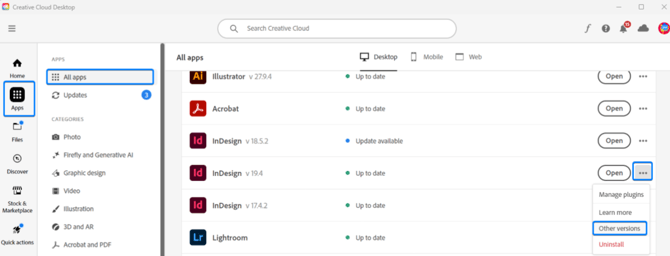
- Once the Creative Cloud Desktop App is open, locate InDesign in the All apps section. Please note that if this is the first time you are installing InDesign, it can be found under the subcategory "Included in the plan". However, if you already have a version of InDesign installed, you will find it under the subcategory "Installed".
- To install other versions of InDesign, click on the context menu on the far right of the InDesign list and then click on "Other versions":
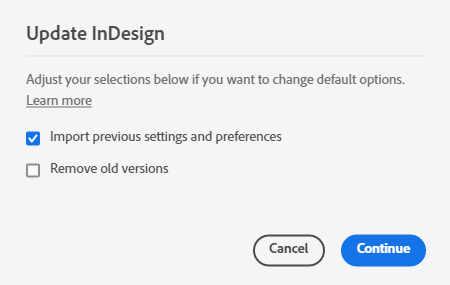
- Make sure you untick "Remove old versions" before clicking "Continue".
- InDesign 2026 (v 21) will now install.
Please note: All minor releases (21.1, 21.2 etc) are compatible with each other.