
When an ESEF Report is merged and created, the zip file will include an excel file named validation_results.
This validation report will look at the complete merged report and give you an overview of any issues found in the report. Please note that some of the validation messages/errors might appear in more than one tab. However, if you resolve the error it should disspear from both places. Here is a brief summary of what each tab in the validation_results file contains:
General information
This tab contains general information about the report, including the reporting period, default currency, generation time, and more.
It will list whether there are any warnings or errors in your report and what tabs in the same file they will be detailed in.
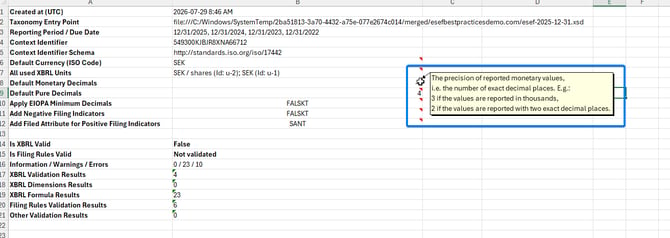
This tab helps verify that the currency and XBRL units (currency/shares) are correct. If a currency appears that is not used in the report, it is recommended to review it, as this may indicate that some tags in the report have the wrong currency applied. Hover over the red icon to display additional information about the field. This tab can also be used to verify that the correct Context Identifier (for example, the LEI code) and reporting period are being used in the report.
Validation Overview
This tab lists all warnings and errors found in the merged report. Any warning or error shown here will also appear in the specific tab it originates from, such as Taxonomy Spec 2.1 Validation or Instance Formula 1.0 Validation.
Presentation Linkbase
This tab displays all tags in the report in a hierarchical view of the tagging structure. It also shows the fact value and additional information for each tag, such as type, period, balance, and unit.
Calculation Linkbase
This tab shows the monetary items in the report and how the calculations are structured and presented.
Definition Linkbase
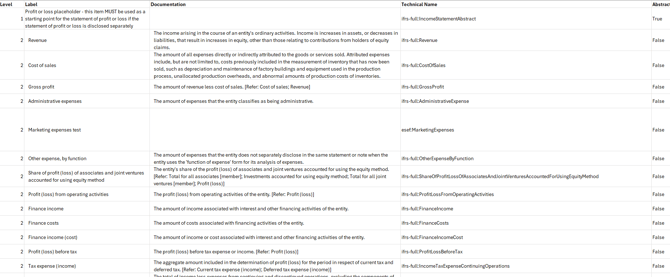
This tab lists all the items in the taxonomy, including abstracts with a description of each of them.
999999 Line items not dimensionally qualified
This tab lists all tags applied in the report that do not require a member tag. Dimensions, or members, are most commonly relevant for the Statement of Changes in Equity table in ESEF reporting.
Table abstracts
A separate tab is included for each table defined with an abstract tag. Examples include:
01 - Profit or loss
02 - Statement of comprehensive income
03 - Statement of financial position
04 - Statement of changes in equity
05 - Statement of cash flows
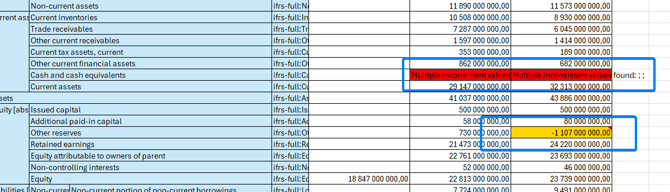
These tabs will show the hierarchy of line items applied in each table as well as the fact value for each given period. If any errors or warnings are presented and associated with a tag, they are displayed here (see example image below).
Report Generation
This tab shows any issues related to the rendering of the report.
Example:
- Private character \uE098 was found 1 time in non tagged areas.
Taxonomy Spec 2.1 Validation
This tab shows information about the taxonomy used in the report. It focuses on the technical integrity of the XBRL file based on the core XBRL 2.1 standard, ensuring that tags, contexts, units, and basic calculations follow the required XBRL structure.
Instance Formula 1.0 Validation
This tab evaluates the report against XBRL Formula assertions defined by taxonomy authors and regulators (such as ESMA for ESEF reporting). It highlights any errors or warnings related to the accuracy of financial calculations within the report.
Example:
- Reported value is below 0
Filing Rules Validations
Any issues related to the Filing Rules will be listed in this tab. For further guidance on how to resolve warning or error messages, kindly refer to the following support article where we have listed common messages and how to resolve them: